
·general
The Future of Work in 10 Years: What Work Could Look Like by 2036
The future of work in 10 years, grounded in WEF, McKinsey, Stanford and Nature data: jobs, AI agents, remote work, shorter weeks and the skills that will matter.
Watch how Didon runs in the background, automatically tracks your activities, and delivers clear productivity metrics tailored to your workflow.
Remote teams struggle with visibility. Freelancers waste hours on manual timers. Founders lack the data to make informed decisions. Traditional methods leave you guessing instead of growing.
The time spent managing tools eats into the time for actual work. You end up with incomplete logs, inflated focus estimates, and no clear picture of where your day actually went.
You may need productivity metrics that are automatic, accurate, and actionable.

“What you work on is far more important than how hard you work.”
 Naval RavikantEntrepreneur & Investor
Understanding your productivity starts with knowing which numbers matter. Here are the core metrics Didon tracks for you and why each one counts.
A split of how your hours fall across different types of work—client projects, admin, communication, and research. Helps you spot where high-value time is leaking.
For freelancers and agencies, this is the metric that directly ties to income. Didon separates projects automatically so nothing slips through.
The hours you spend in uninterrupted, deep work. Most people overestimate this by 30–40%. Knowing your real focus time is the first step to protecting it.
Time spent on email, Slack, and meetings. It's necessary, but when it quietly eats half your day, you need to see it clearly before you can fix it.
How often you switch context or get pulled away from a task. High distraction rates are one of the biggest hidden drains on output.
A single number that summarizes your day, built from focus time, task completion, and distraction patterns. Useful for spotting trends over time without drowning in data.
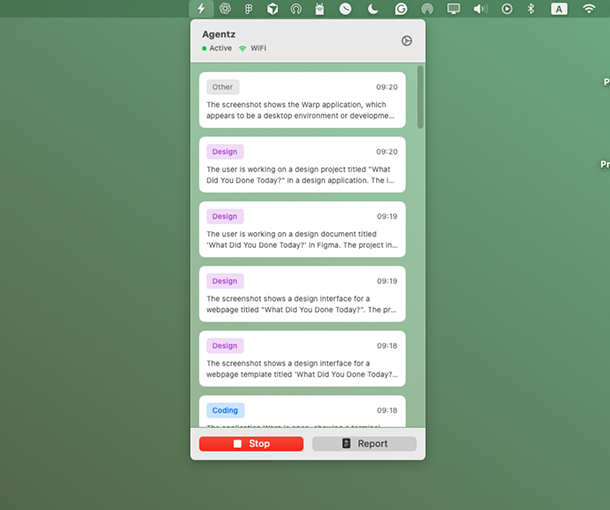
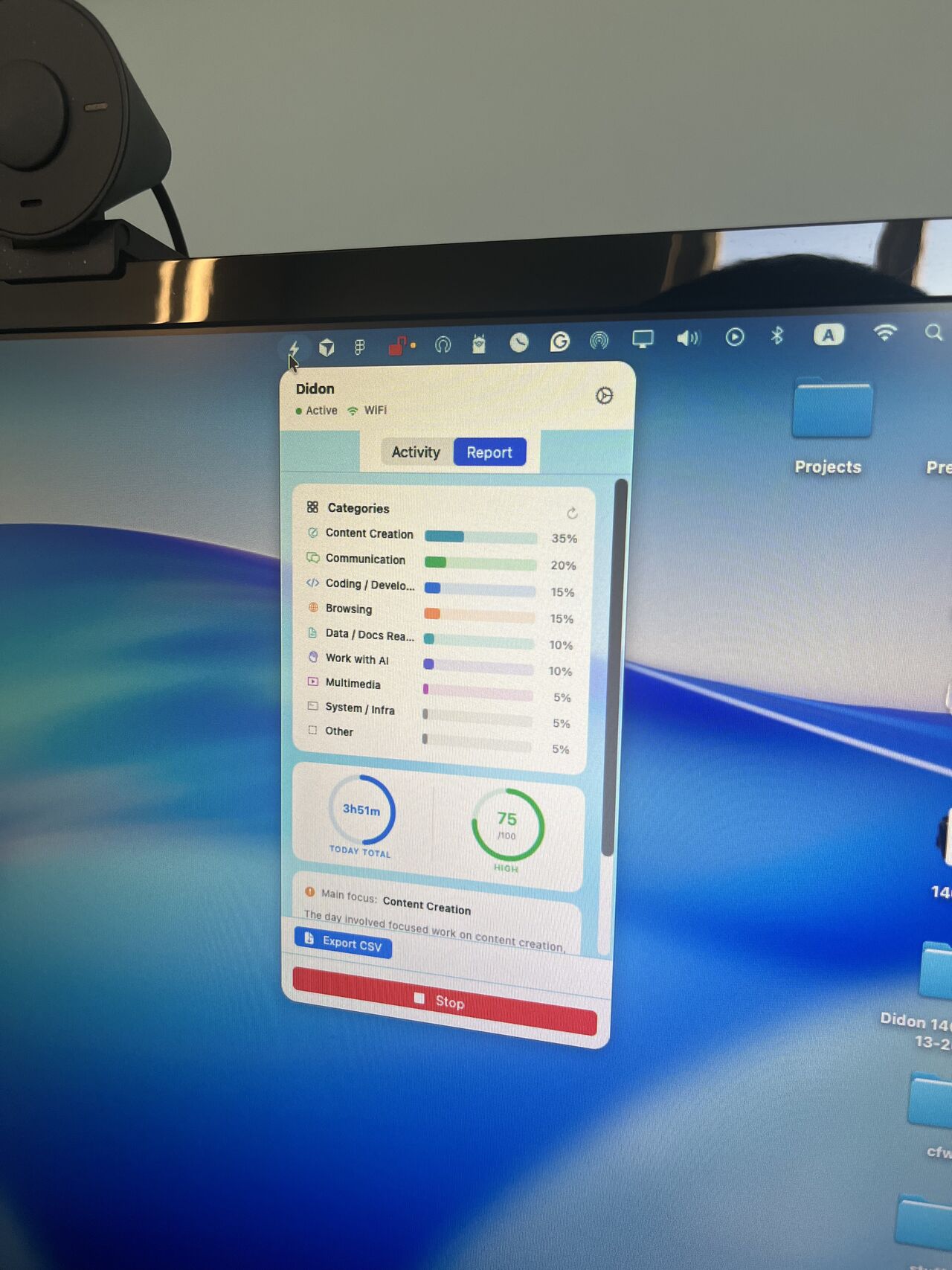
AI Work Productivity Tracker eliminates the guesswork. It runs in the background, automatically tracking your activities and delivering clear, actionable insights.
Get real-time analytics, focus-time reports, and productivity metrics tailored to your workflow. Whether you're scaling a startup, managing a remote team, or freelancing, Didon helps you maximize your time and efficiency.
No manual timers. No end-of-day reconstruction. Didon captures what you're actually doing, categorizes it automatically, and surfaces the patterns that matter—focus time, distraction rates, and project breakdowns.
All processing happens on your device. Your screen activity stays on your Mac. You get the visibility you need without sacrificing privacy.
Didon's AI productivity system runs in the background to capture activity, measure focus, and deliver actionable metrics—without manual input.
Didon runs quietly in the background, capturing periodic screenshots and app usage to understand exactly how you spend your time—without any manual input or timers.
Local AI analyzes your screen activity on your Mac, detects task categories, and calculates productivity metrics like focus time and distraction rates.
Get real-time analytics, focus-time reports, and a daily productivity score. Spot trends, protect deep work, and optimize your workflow with data—not guesswork.
Running a startup means juggling priorities. Didon automates task tracking, delivering actionable metrics that help you scale efficiently. Save hours on manual reporting and gain insights to lead your team smarter.
Every hour counts when you work for yourself. Track your time without distractions, generate detailed reports, and uncover patterns to focus on what drives your earnings.
Visibility is key in hybrid workflows. Get real-time analytics and transparent dashboards that show how your team is spending their time. Enhance collaboration and ensure everyone stays productive, no matter where they work.
Stop guessing where your team's time goes. Gain a clear picture of activities, identify bottlenecks, and create reports that optimize workflows—all without adding administrative overhead.
| Feature | Didon | Clockify | Harvest | KPI Tracking Systems |
|---|---|---|---|---|
| AI-Powered Insights | Yes | No | No | Varies |
| Automatic Task Detection | Yes | No | No | No |
| Productivity Metrics | Comprehensive | Basic | Time tracking only | Goal-focused only |
| Ease of Use | Intuitive and automatic | Manual tracking | Manual tracking | Requires manual data input |
Tracks time but requires manual start/stop for every task. Didon goes further with AI-powered productivity metrics—focus time, distraction rates, and automatic categorization.
Built for time tracking and invoicing, but doesn't analyze productivity patterns. Didon delivers comprehensive metrics beyond hours logged.
Focus on goal metrics but require manual data input. Didon captures activity automatically and turns it into actionable productivity insights.
Manual tracking is cumbersome and prone to errors. AI productivity trackers automate the process, eliminating guesswork and saving hours of administrative time.
They provide actionable insights—patterns in focus time, task efficiency, and distraction rates—helping you make smarter decisions. With AI, you get accuracy, speed, and deeper analysis without lifting a finger. Want the data to actually change your behavior? Didon's upcoming AI productivity coach turns those insights into real-time accountability.
macOS only right now. If you're tired of guessing where your time goes, Didon gives you the data to fix it.
Common questions about AI work productivity tracking with Didon.
Tips on productivity, time tracking, and automated reporting
The future of work in 10 years, grounded in WEF, McKinsey, Stanford and Nature data: jobs, AI agents, remote work, shorter weeks and the skills that will matter.
How developers work in 2026, from the latest Stack Overflow, JetBrains, METR and Microsoft data: where they work, how much they code, and what AI agents changed.
Seven hidden productivity killers that never show up on a to-do list, what the research says each one costs, and how to spot them in a week of time data.