

·general
From Chaos to Clarity: How Work Journals Help Freelancers Stay Organized
Struggling to stay organized as a freelancer? Discover how work journals bring structure to multiple projects and time tracking. Start today!
Didon Read →
Watch how Didon runs in the background, tags projects automatically, and generates accurate daily work reports from your Mac activity.
You open your laptop with a plan. Write code. Draft the campaign. Ship the feature. Then someone pings you on Slack. You switch to email. Check analytics. Two hours later, you're back to the original task—and you have no idea what just happened.
Manual time trackers don't help. They require you to remember to start a timer before every task. Stop it when you switch. Tag it correctly. Most of the time, you forget—or leave the timer running through lunch. By Friday, your logs are a mess of overlapping entries and missing hours.
Freelancers lose billable time. Agencies can't justify invoices. Founders have no idea where their week went. And everyone spends 30 minutes at the end of the day trying to reconstruct what they actually did.
You need logs that are accurate, automatic, and private. You shouldn't have to choose between productivity and security.

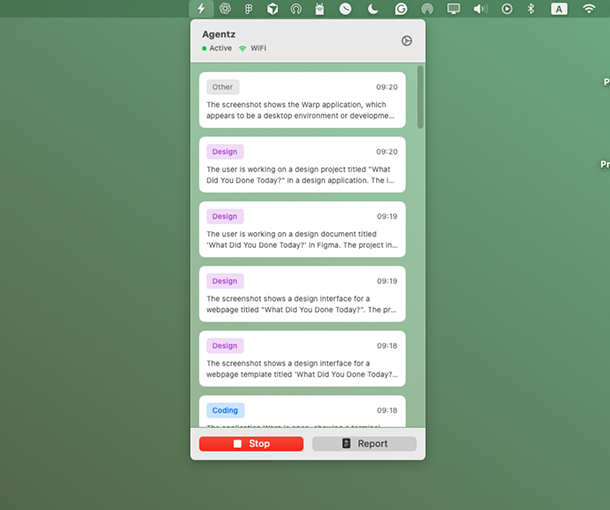
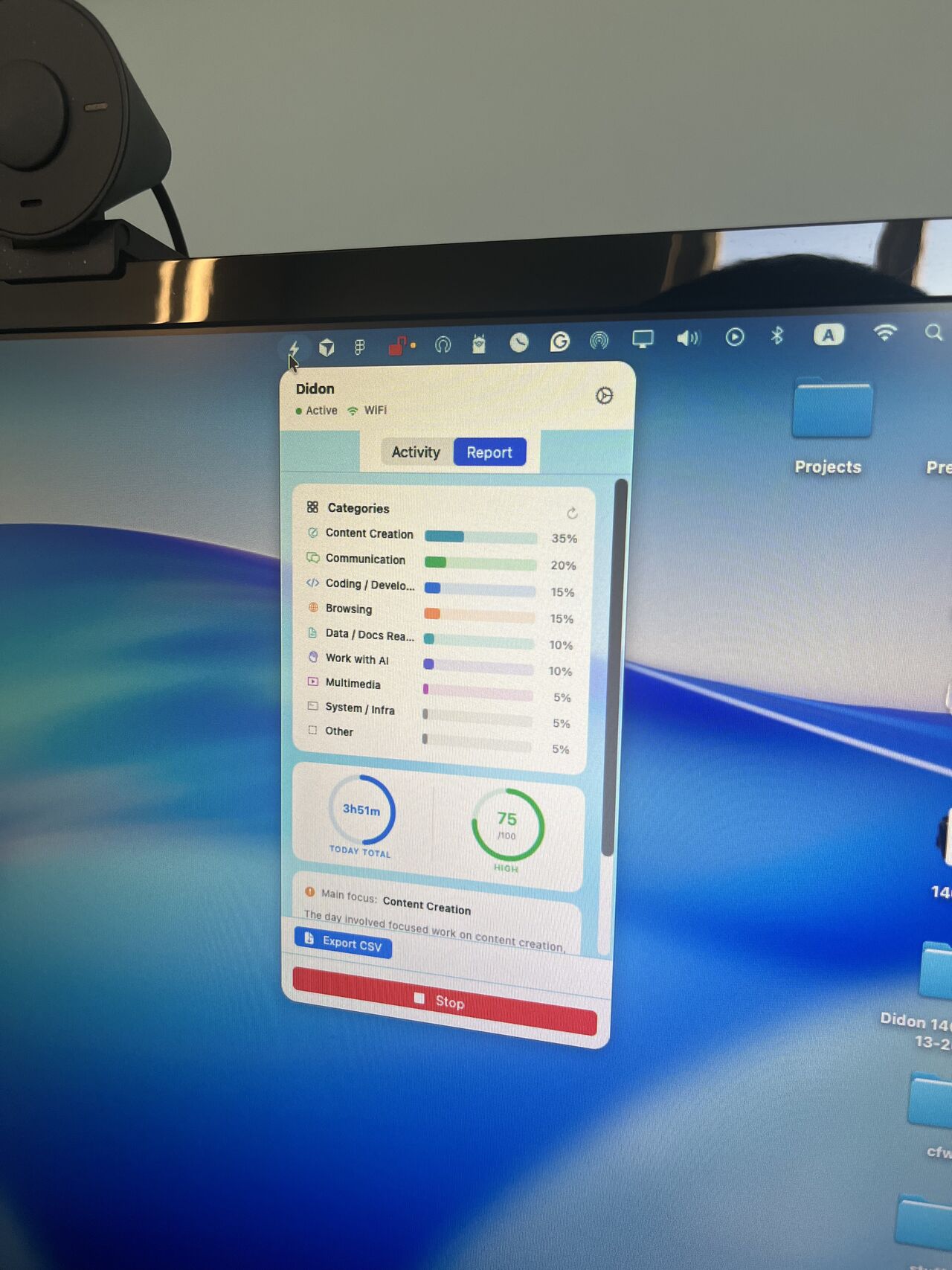
Didon runs silently on your Mac and captures what you're working on—without you touching a timer.
It takes periodic screenshots, analyzes them locally with AI, and tags each block of time to the right project or client. At the end of the day, you get a structured report that shows exactly what you accomplished.
The AI understands context. It knows the difference between a Slack thread about a bug and actually fixing the bug. Between research and execution. Between deep work and admin.
You don't format anything. Didon generates summaries of your work log in plain language: "Debugged authentication flow for ClientX (2.3 hours)." Ready to bill. Ready to review. Ready to export.
All processing happens on your device. Screenshots never leave your Mac. Over 95% accuracy on routine tasks. Zero manual input. Complete privacy.
Didon's AI work log system runs in the background to capture activity, tag projects, and deliver accurate daily reports—without manual input.
Provide your project goals and specific objectives to the AI. This context allows the system to accurately categorize your work and tag activities to the right client or project.
Didon runs quietly in the background, capturing periodic screenshots and app usage to understand exactly how you spend your time—without any manual input or timers.
Local AI analyzes your screen activity on your Mac, tags tasks to projects, and generates structured daily work reports. Export or share on your terms—your privacy stays a top priority.
Stop writing daily standups from memory. Didon logs commits, pull requests, debugging sessions, and code reviews automatically. Your reports include commit summaries and time spent per feature. Ship code, not status updates.
Track campaign work, client calls, and content creation without switching between tools. Didon tags activities by client and project, so you can bill accurately and analyze what's driving results. No more spreadsheets.
You wear ten hats. Didon shows you which ones took the most time—and which tasks you should delegate. See patterns in your week that you'd never catch manually. Make better decisions about where to focus.
Bill clients with confidence. Didon generates timestamped, detailed logs that justify every invoice line. No disputes. No guesswork. Just accurate records of the work you did.
| Feature | Didon | Clockify | RescueTime | Manual Logs |
|---|---|---|---|---|
| Automatic capture | ✓ | ✗ | ✓ | ✗ |
| AI project tagging | ✓ | ✗ | ✗ | ✗ |
| Context awareness | ✓ | ✗ | ✗ | Depends on memory |
| Privacy | Local processing | Cloud-based | Cloud-based | You control it |
| Billable reports | Auto-generated | Manual export | Not for billing | Manual formatting |
| Setup time | < 5 min | Project setup | < 10 min | Ongoing effort |
| Accuracy | 95%+ | Depends on discipline | 70–80% | 80–85% |
Requires you to start and stop timers manually for every task. Didon eliminates the start/stop cycle entirely—AI handles project tagging for you.
Tracks which apps you use but doesn't understand what you're doing in them. Didon delivers deeper, context-aware insights—not just app-level data.
Prone to memory errors and formatting work at the end of each day. Didon logs what actually happened—not what you think happened.
Most time trackers make you press start and stop. Didon runs in the background and figures out what you're working on automatically. No timers. No manual logging. Just open your laptop and work.
The AI doesn't just record activity—it understands context. You get structured daily and weekly reports that show patterns you'd never catch manually. Where your focus went. What took longer than expected. What you shipped.
macOS only right now. If you're a Mac user tired of forgetting to start timers or wondering where your day went, this is built for you.
Tips on productivity, time tracking, and automated reporting
Struggling to stay organized as a freelancer? Discover how work journals bring structure to multiple projects and time tracking. Start today!
Struggling to choose between productized services and dedicated teams? Learn which model fits your business needs, budget, and goals. Read now.
Stop tracking vanity metrics. Learn the 3 core productivity metrics every solo founder needs to build a sustainable business. Focus on what drives revenue.